Open Source Software Download: Verify, Install, Stay Safe
You're on a project page with a large green Download button, the release looks recent, and you need the software running now. It's tempting to click first and investigate later. That habit turns an open source software download into an unexamined trust decision, especially when the file will access credentials, wallet data, build tools, or production systems.
A safer approach treats the download as a software-supply-chain event. You identify the actual project, select a versioned release, verify its SHA-256 checksum and signature when available, install with limited privileges, and record what you used. The process takes longer than a blind click, but it gives you evidence you can inspect, reproduce, and revisit.
Table of Contents
- Why the Download Button Is the Riskiest Click You'll Make
- Finding the Real Source Before You Download Anything
- Verifying Checksums and Signatures the Right Way
- Binary Download or Build From Source
- Building From Source Without Breaking Everything
- Installing Safely and Recording What You Did
- Your Download Checklist and Common Questions
Why the Download Button Is the Riskiest Click You'll Make
A download page can look legitimate while hiding several unanswered questions. Who published this file? Which release does it represent? Where was it built? Has the asset changed since the project reviewed its source code? The button answers none of them.
The risk doesn't depend on whether the software is a text editor, a developer tool, a wallet, or a mining client. A malicious installer can request broad permissions, search for secrets, alter configuration, or establish persistence before you ever open the application. Open source code improves inspectability, but a binary downloaded from an unknown or compromised channel still needs its own verification.

The trust chain behind one file
Think of the event as a chain of decisions rather than a single click:
- Project identity: Does the repository belong to the actual maintainers?
- Release identity: Is this a tagged, versioned release rather than an unpinned development build?
- Asset identity: Does the filename match your operating system and architecture?
- Distribution identity: Did the file come from the project's documented release channel?
- Build identity: Can the maintainers or an independent party connect the binary to reviewed source code?
- Installation context: Will the first execution happen with unnecessary access to sensitive data?
A weakness at any point can undermine the rest. A checksum copied from the same compromised page as the binary may confirm only that the attacker replaced both files consistently. A signature from an unverified key may prove that someone signed the asset, not that the signer is the maintainer you intended to trust.
Practical rule: “Open source” describes how code is made available. It doesn't automatically prove that a particular executable came from that code.
The consequences become sharper with cryptocurrency software. A compromised text editor is disruptive, but a tampered wallet can expose private keys, and a mining client can misuse hardware or credentials while appearing to work normally. For a cryptocurrency wallet or miner, record the binary hash before deployment and, where possible, compare it with a hash reproduced by an independent machine or build environment. The Kicksecure guidance on binary build locations describes this broader verification workflow and its common failure modes.
Sonatype reported that targeted malware represented 47.3% of classified open-source malware advisories in 2025, compared with 2–4% annually from 2021 through 2024, and that 53% of malicious packages analyzed in 2025 were designed to compromise developer environments during installation. Those figures don't mean every release is dangerous. They do mean installation deserves the same attention as source selection.
Finding the Real Source Before You Download Anything
The safest download starts before the file reaches your disk. Begin with the project's known website, documentation, or established organization account, then follow its repository and release links. Search results and third-party directories can help you discover a project, but they shouldn't be your final authority for a security-sensitive asset.
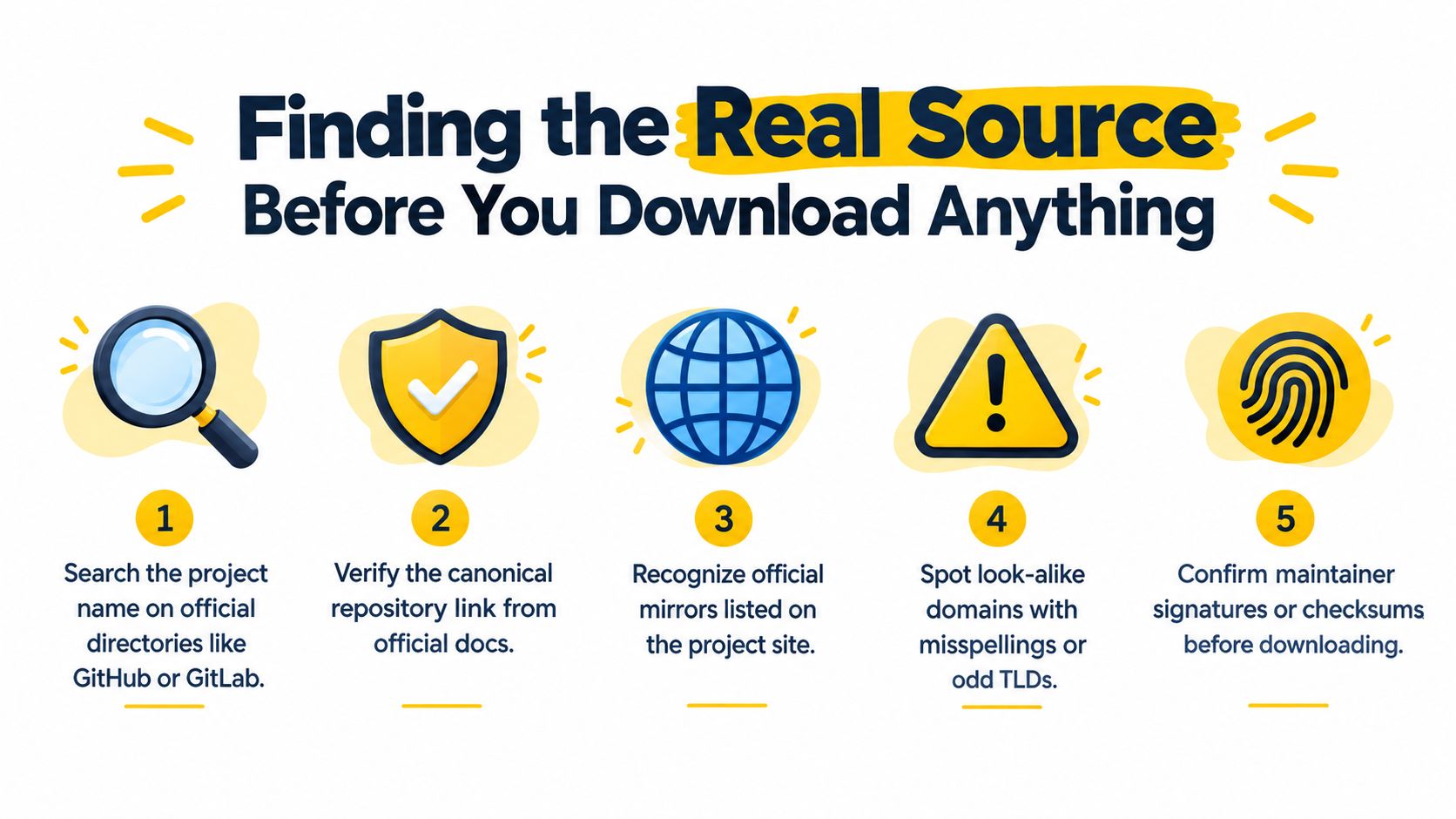
Pass five gates before saving the asset
Locate the canonical repository. Use the project's official documentation to confirm whether the source lives on GitHub, Codeberg, GitLab, or another host. Don't assume the first repository with a familiar name is genuine.
Inspect project continuity. A real project usually has a meaningful README, issue history, release notes, license information, and commits that fit its stated purpose. A recently created copy with little history, copied branding, or unexplained binary-only releases deserves caution.
Read the release page address carefully. Look for misspellings, unusual subdomains, altered organization names, and odd top-level domains. A look-alike page can reproduce logos and instructions while directing users to a modified asset.
Match the release to your platform. Select the documented version and the correct operating system or architecture. Similarly named files can be unrelated builds, test artifacts, or malicious replacements.
Find verification material before downloading. Check whether the release includes a SHA-256 file, detached signature, signing-key fingerprint, or reproducible-build information. If the project publishes the key only beside the download, seek an independent confirmation through its documentation, repository history, or maintainer-controlled channel.
For security teams assessing projects rather than installing them, pentesting open-source components is a useful adjacent practice. It shifts attention from the visible application to the dependencies and components that enter the environment with it.
Cascoin illustrates why repository confirmation matters for crypto software. Its publicly viewable code is available through the project's documented Codeberg and GitHub homes, while the downloadable wallet and mining clients should be matched to the project's own release information rather than to an unofficial fork. The project's GitHub code repository documentation provides a project-specific reference point for checking that relationship.
Don't confuse convenience with provenance
Package managers and curated directories reduce search friction, but they introduce another distribution layer. Before using one, verify the package name, publisher identity, supported versions, repository metadata, and update mechanism. A package manager can make installation repeatable, but it doesn't remove the need to inspect dependencies or validate what the package contains.
A project that offers no clear canonical repository, no release history, and no way to verify assets may still be harmless, but you have less evidence. For software that handles keys, credentials, or production workloads, choose a better-documented alternative or isolate the test environment until the provenance question is resolved.
Verifying Checksums and Signatures the Right Way
A SHA-256 checksum is a compact fingerprint of a file. When you compute the hash locally and compare it with a value published through a trustworthy channel, you can detect accidental corruption or a different file being substituted. The checksum doesn't prove that the code is benevolent, that the publisher is authentic, or that the published checksum wasn't altered alongside the download.
Save the release asset first, then compute its hash with the operating system's built-in tools:
Windows Command Prompt
certutil -hashfile C:\Path\to\software.exe SHA256
Windows PowerShell
Get-FileHash "C:\Path\to\software.exe" -Algorithm SHA256
macOS
shasum -a 256 ~/Downloads/software.dmg
Linux
sha256sum ~/Downloads/software.tar.gz
Compare the complete output character by character. Don't rely on a short prefix, and don't treat a mismatch as a minor warning. Re-download from the documented release page, confirm that you selected the right platform asset, and investigate before execution.
Signatures add an identity check
A maintainer signature can provide stronger provenance than a checksum alone, but only if you validate the signing key. For a detached GPG signature, obtain the signature file and the public key from independent channels, import the key, and inspect its fingerprint:
gpg --import maintainer-key.asc
gpg --fingerprint MAINTAINER_KEY_ID
gpg --verify software.tar.gz.asc software.tar.gz
The final command checks whether the signature matches the file. The fingerprint check asks whether the key is the one you intended to trust. Confirm that fingerprint through a separate maintainer-controlled channel, not just the same download directory.
An SSH-based signing workflow follows the same principle. Import the public signing key, compare its fingerprint with an independent reference, and use the project's documented verification command. If a release has a signature but no trustworthy way to validate the key, treat the signature as incomplete evidence.
The Cascoin open-source software audit guidance is relevant when you need to move beyond a single file and inspect the project, build process, and dependencies together.
Verification methods and what each one proves
| Method | What it proves | When to use it |
|---|---|---|
| SHA-256 checksum | The local file matches the published byte sequence | Every release where a trustworthy checksum is available |
| Detached GPG signature | The file was signed by the corresponding private key | High-risk software, production tools, wallets, and miners |
| Key fingerprint comparison | The signing key matches an independently confirmed identity | Whenever signatures are used |
| Reproducible build comparison | Independent builds can produce matching output | Critical infrastructure and security-sensitive binaries |
| Antivirus or malware scan | A scanner found no known detection at scan time | As an additional control, never as a replacement for cryptographic verification |
Dependency verification matters too. A 2025 cross-ecosystem study covering 1.1 million packages and 47,000 public CI/CD pipelines reported that 82% of sampled popular GitHub projects imported at least one package with a known CVE, while 29% inherited a critical CVE through three or more transitive dependency edges. The figures reinforce a practical point: validating the top-level file doesn't eliminate risk hidden in what it installs.
Binary Download or Build From Source
A prebuilt binary isn't automatically careless, and compiling from source isn't automatically safe. The right choice depends on your ability to inspect the build, maintain dependencies, support the target platform, and verify the resulting artifact.
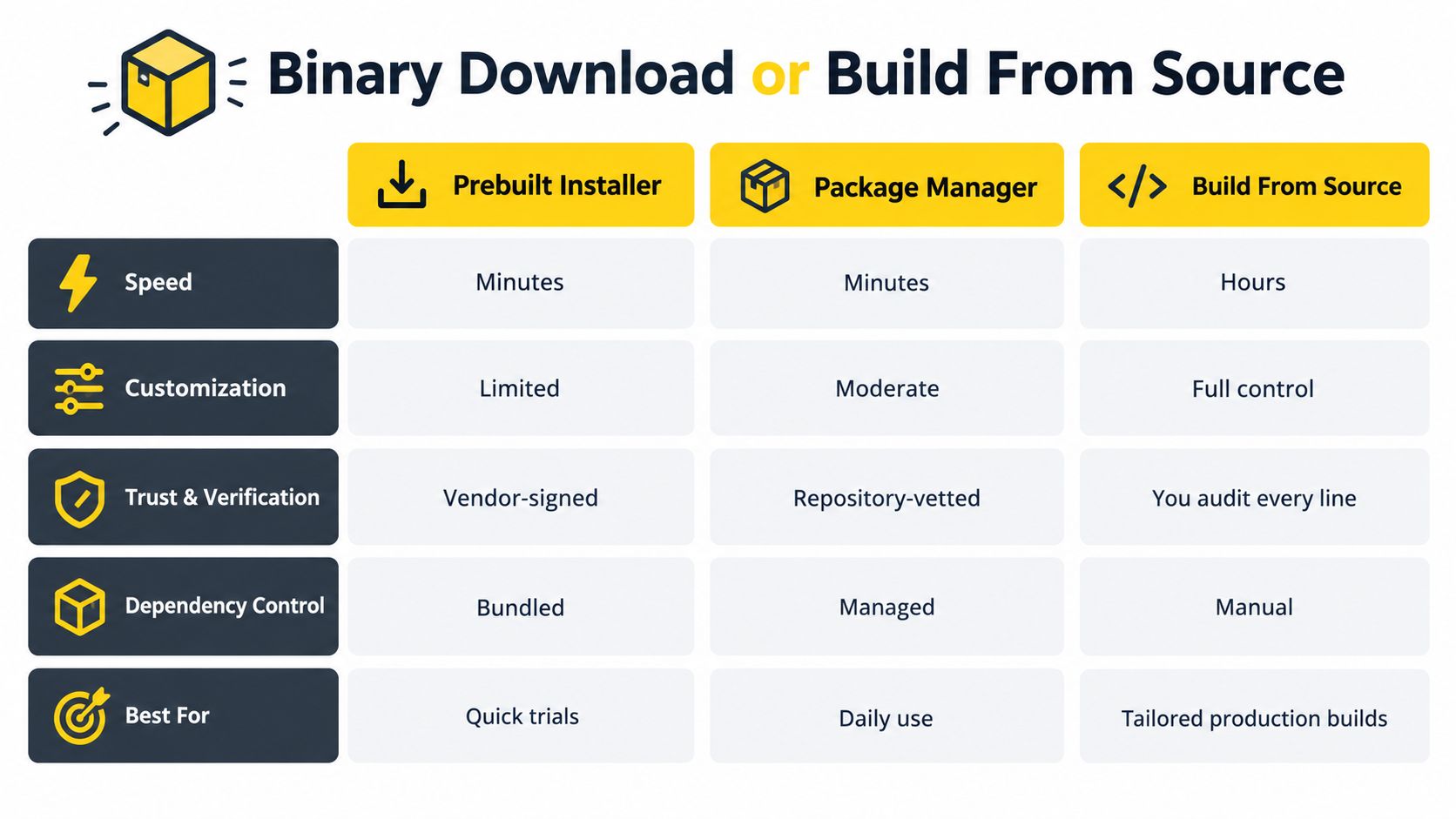
| Option | Strengths | Trade-offs | Suitable use |
|---|---|---|---|
| Prebuilt installer | Fast setup, broad accessibility, often configured for the platform | You rely on the maintainer's build environment and release process | Trying a tool, supporting a common desktop platform, or using an officially signed release |
| Package manager | Repeatable commands, dependency handling, familiar update workflows | Package metadata, maintainers, mirrors, and transitive dependencies add trust decisions | Regular development use where the package source is well maintained |
| Build from source | Control over flags, patches, target architecture, and dependency choices | Requires toolchains, maintenance, audit effort, and a reproducible process | Auditing, unusual platforms, tailored production builds, or contribution work |
Choose based on the failure you can manage
Use an official binary when accessibility and timely updates matter more than customizing the build. Verify the release, run it with limited privileges, and preserve the hash and source URL. For a casual CPU miner who wants a MinotaurX client, compiling every dependency may create more operational risk than using a documented, verifiable release.
A package manager fits daily use when its repository, signing process, and update behavior are clear. Pin versions for automation, review dependency changes, and generate an inventory such as an SBOM when the software enters a larger application.
Build from source when you need a specific compiler configuration, a platform the maintainer doesn't support, or a closer audit of the build path. A contributor examining a mining client or a team operating a customized SHA-256 implementation may accept the extra work because control and review matter more than immediate convenience.
Reproducibility changes the question
A successful local compilation proves that your environment produced a working binary. It doesn't prove that the source is safe, that your dependencies were clean, or that your output matches what other users received. Reproducible builds provide an independently verifiable path between source and binaries, helping detect unauthorized changes in build inputs or infrastructure.
The July 2025 Reproducible Builds report stated that 3,319 source packages were tested and 99.5% were reproducible, leaving 9 packages with significant unresolved problems plus 7 pending fixes. The result is encouraging, but it isn't a universal guarantee. You still need to identify the exact source revision, build flags, toolchain, dependencies, and environment.
A practical decision takes less than a minute:
- Need a supported platform and quick setup? Choose a verified binary.
- Need controlled updates for routine development? Use a reputable package manager with pinned versions.
- Need custom hardware support, source review, or a specialized production build? Compile, document, and compare the result with an independent build where possible.
Building From Source Without Breaking Everything
Source builds fail in predictable places, and the error message often tells you which layer needs attention. Start by reading the entire build guide before installing tools or running scripts. Record the required compiler, language runtime, build system, dependency versions, operating system, architecture, and configuration flags.
Pin the source and prepare the environment
Clone a specific tag or commit rather than building the default branch:
git clone
cd project
git checkout vX.Y.Z
The address above is a structural example. Use the project's documented repository URL and its real release tag. Confirm the tag locally, inspect the changelog, and review build scripts before execution.
Install only the toolchain the project documents. A C or C++ project may require GCC or Clang, Make, or CMake. Other projects may depend on Rust, Go, Python, or platform-specific SDKs. Keep the build in a disposable directory or isolated environment, especially when the instructions ask you to run shell scripts or fetch dependencies automatically.
A clean build record should include:
- Source commit or tag
- Compiler and linker versions
- Dependency versions
- Build flags and environment variables
- Operating system and architecture
- Build logs and generated artifact names
- SHA-256 hash of the resulting binary
For developers using a graphical workflow, installing Qt Creator can help configure and inspect Qt-based projects, but the IDE doesn't replace source pinning or artifact verification.
Read failures as evidence
A missing header usually indicates an undeclared or unavailable development dependency. A linker error often points to an incompatible library version, architecture mismatch, or incorrect build flag. Fix those issues by following the project's documented prerequisites, not by downloading random libraries from search results.
A checksum mismatch after a supposedly reproducible build deserves more care. First confirm the source revision, compiler, flags, locale, timestamp handling, and dependency versions. If an independent build still differs, preserve both hashes and logs, then ask the maintainers for an explanation before deploying the binary.
Don't assume that a successful build validates every line of source. Review suspicious install scripts, generated code, dependency fetches, and post-build steps separately. The build process is part of the software you're trusting.
A reproducible build is evidence about consistency, not a safety certificate for the source itself.
When the project publishes a known-good hash, compare your output against it. A match increases confidence that your environment produced the intended artifact. A mismatch doesn't automatically mean malicious code, but it does mean the result needs explanation before it enters a wallet, miner, CI runner, or production host.
Installing Safely and Recording What You Did
A verified file can still cause damage if installation gives it unnecessary access. Use a standard user account, decline bundled offers, review requested permissions, and isolate the first launch in a sandbox or disposable virtual machine when the software is unfamiliar.
As noted earlier, Sonatype found that 53% of malicious packages analyzed in 2025 were designed to compromise developer environments, including credentials and secrets, in its software supply-chain research. Treat installation behavior as part of the artifact you are evaluating, not as an administrative afterthought.
Restrict the first launch
Use a separate browser profile and keep wallet data in a dedicated directory. Do not expose a primary SSH key to a newly downloaded miner or build tool. For cryptocurrency software, use a separate account or machine for the first run, then watch outbound connections, file changes, and new startup entries.
On Linux, run unfamiliar software inside a namespace sandbox such as bubblewrap, with the home directory read-only or inaccessible, temporary storage isolated, and network access disabled unless the program needs it. On Windows, apply an AppLocker rule that allows only the approved path and publisher or file hash. These controls add setup work and can block legitimate updates, but they limit what a compromised binary can reach.
A clean antivirus result cannot establish publisher identity or prove that the file matches the reviewed release. Cryptographic verification and controlled execution answer different questions, so use both when the software handles keys, credentials, financial assets, or production data.
Run a pre-flight check
Before launching an installer, confirm the account and location, then inspect the file rather than opening it directly:
whoami
pwd
ls -l ./installer
sha256sum ./installer
On Windows PowerShell, the equivalent checks are:
whoami
Get-Location
Get-Item .\installer.exe
Get-FileHash .\installer.exe -Algorithm SHA256
Compare the resulting hash with the release record, and stop if the path, account, filename, or checksum differs from your notes.
Keep an installation record
Record the project and repository URL, release version or source commit, operating system and architecture, asset filename, SHA-256 checksum, signature and key fingerprint when available, installation date, account used, configuration changes, and dependency versions. This supports rollback and incident investigation. Re-verify after a release, hosting, signing-key, or distribution-method change.
Download counts are not security evidence. GitHub release counters can reflect asset-URL access rather than completed downloads and may be distorted by retries, automation, caching, or repeated requests.
Cascoin check: Retain the exact client version and binary hash with your deployment notes. Compare the running client with activity visible through the Casplorer block explorer, while treating chain activity as operational evidence, not proof that the binary was authentic.
Your Download Checklist and Common Questions
Keep this short checklist open beside every security-sensitive download.
| Step | Action | Done |
|---|---|---|
| Source | Confirm the canonical repository and release page | ☐ |
| Version | Select a pinned, documented release asset | ☐ |
| Hash | Compute and compare the SHA-256 checksum | ☐ |
| Signature | Validate the signature and key fingerprint when available | ☐ |
| Environment | Install with least privilege and isolate first execution | ☐ |
| Record | Save the version, platform, hash, and source URL | ☐ |
How often should I re-verify trusted software?
Re-verify every new release and whenever the project changes its hosting, signing key, build process, or distribution method. Familiarity is useful context, not a substitute for current evidence.
What if the project publishes binaries without signatures?
Use the checksum if its publication channel is trustworthy, then reduce exposure with a sandbox or disposable machine. For wallets, miners, developer tools, and production software, consider building from source or selecting a project with stronger release provenance.
Do package managers remove transitive dependency risk?
No. They automate retrieval and installation, but dependencies can introduce vulnerabilities, unexpected licenses, or compromised install scripts. Pin versions, review dependency changes, and maintain an inventory of what entered the environment.
Is a clean antivirus scan enough?
No. Scanning can detect known patterns, while a checksum and signature help establish file identity and publisher provenance. Neither control replaces the other.
For a practical open-source software download, Cascoin offers publicly viewable wallet and mining code through Codeberg and GitHub, with network activity available through Casplorer for independent observation. Review the release, verify the artifact, and then visit Cascoin if you want to inspect the project and choose a client with the same supply-chain discipline.