How to Optimize CPU Performance for Mining

Closing background applications, updating drivers, and selecting a high-performance power plan won't tell you whether your CPU is limiting throughput. They may change system behavior, but they don't identify the stalled pipeline, the starved memory subsystem, the thermal limit, or the thread competing for the same core.
The practical answer to how to optimize CPU performance starts with measurement. Profile the workload, locate its dominant execution path, classify the bottleneck, then change one variable and measure again. For CPU mining, that means optimizing sustained hashes per watt, not chasing a short-lived clock speed or a benchmark result that disappears once the system reaches its steady thermal state.
Table of Contents
- Identifying the True CPU Bottleneck
- Tuning the Operating System and Thread Affinity
- Optimizing Power, Thermals, and BIOS Settings
- Compiler Tweaks and Runtime Optimizations
- Configuring MinotaurX and Labyrinth Mining for Efficiency
- Verifying Stability and Measuring Real-World Gains
Identifying the True CPU Bottleneck
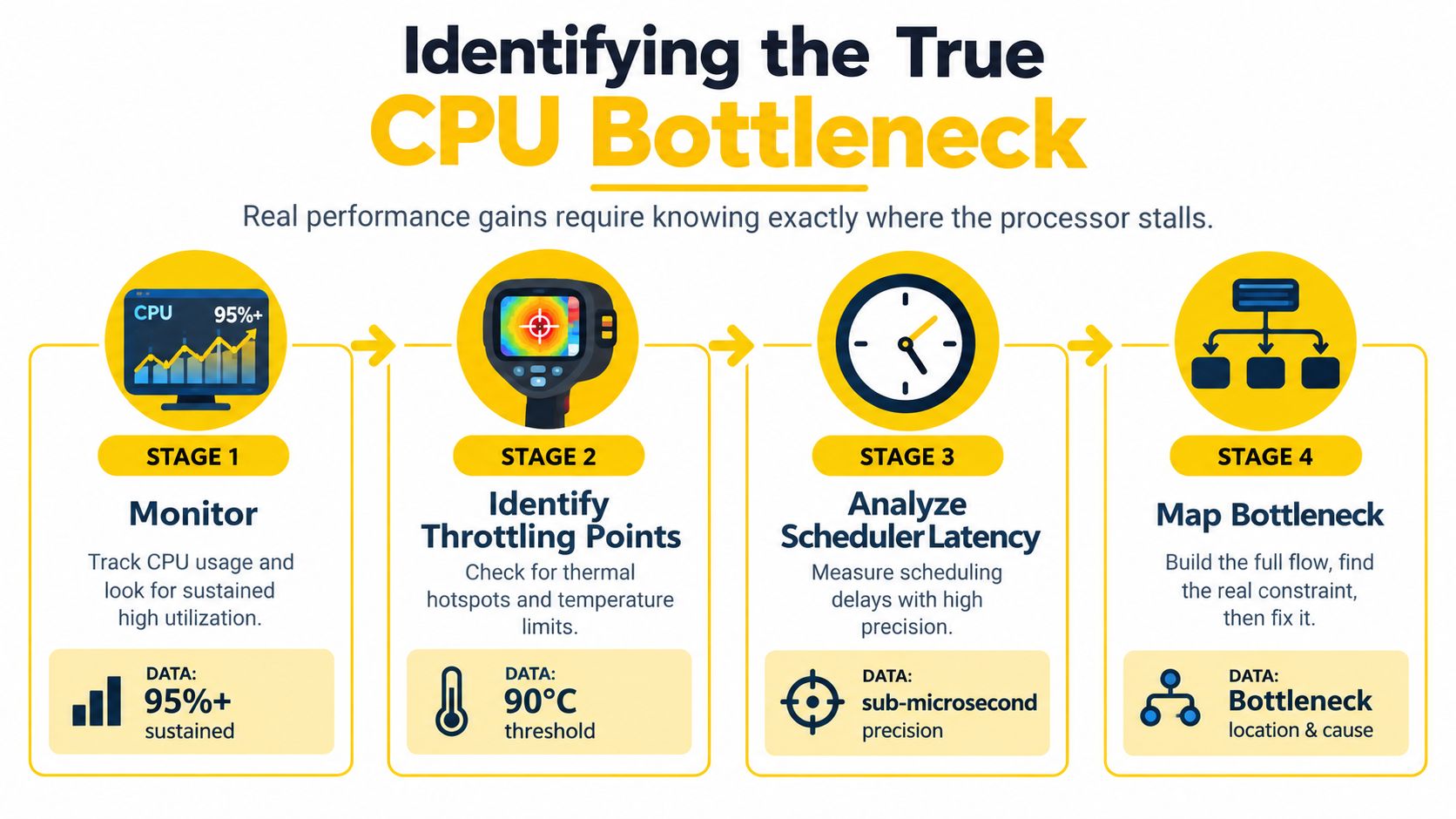
A processor can show heavy utilization while still wasting cycles. It may be waiting on memory, recovering from branch mispredictions, losing time to instruction delivery, or competing with other runnable threads. Conversely, moderate utilization doesn't prove that the CPU is healthy. A virtual machine, for example, can have work ready to run while waiting for physical CPU time.
Before changing BIOS settings or miner flags, establish what the workload is doing. A hotspot-first workflow begins with the function consuming the most CPU time. Hardware performance-monitoring units can then classify the cost through metrics such as cache misses, branch mispredictions, cycles per instruction, and stalled execution slots. Intel's optimization guidance emphasizes matching code generation and workload behavior to the target microarchitecture, rather than treating every CPU as interchangeable. The CPU performance overview covering Amdahl's Law and benchmarking provides the foundational reasoning behind that approach.
Apply Amdahl's Law before tuning
Amdahl's Law sets a hard ceiling on optimization. If 20% of execution remains serial or otherwise unoptimized, the theoretical maximum speedup is 5x, even if the other 80% becomes infinitely fast. If the serial portion is 10%, the ceiling is 10x. These examples aren't mining promises. They're limits that stop you from expecting a local code improvement to transform the entire workload.
For a miner, the same logic applies to the path that builds a job, handles communication, manages shares, and performs hashing. Improving the hash loop won't remove time spent elsewhere. The improvement matters only if that loop dominates runtime.
Practical rule: Don't optimize the code you can easily see. Optimize the code that consumes the largest share of execution time.
Use counters to classify the stall
On Linux, start with perf stat for a controlled run and use perf record followed by perf report when you need call-stack attribution. On Windows, Intel VTune, Windows Performance Recorder, and the Performance Monitor can expose different parts of the same picture. Record the same workload, thread count, affinity, power state, and measurement interval each time.
Look for a bottleneck category rather than a single alarming counter:
- Cache pressure: Frequent data-cache or instruction-cache misses suggest poor locality, a working set that doesn't fit the relevant cache, or access patterns that defeat prefetching.
- Control-flow waste: Branch mispredictions cause speculative work to be discarded and can leave the pipeline underfilled.
- Frontend limitation: Instruction-fetch or decode pressure means the CPU can't supply instructions quickly enough, even when execution units are available.
- Backend limitation: Execution ports or memory operations are saturated, so adding frequency or threads may deliver little additional work.
Branch-heavy paths deserve special care. Research summarized in the provided technical material reports predictor accuracy above 90% once predictor tables reached around 1K entries in the studied benchmarks, while eliminating branch-target cache misses produced up to about 8% CPU performance improvement in those workloads. Those results are workload-specific, so treat them as indicative evidence, not as a guaranteed result for a miner. The same research also warns that aggressive prefetching can pollute caches and consume unnecessary bandwidth.
The first decision is therefore binary: prove that the CPU is the constraint, or stop tuning the CPU. For a broader practical checklist before changing hardware or settings, use this guide to identify your PC bottleneck first.
Tuning the Operating System and Thread Affinity
Once profiling shows a CPU-bound workload, give the scheduler fewer opportunities to move its hottest threads around. A mining thread that migrates between physical cores can lose locality in private caches and compete with unrelated work. The objective isn't to pin everything blindly. It's to reserve the cores that matter for the workload and leave enough scheduling capacity for the operating system, networking, storage, and monitoring.
Map physical and logical CPUs
Start by identifying the topology. On Linux, lscpu -e shows logical CPU relationships, while lscpu -p provides a compact mapping that can be saved with your benchmark notes. hwloc-ls or lstopo gives a clearer view of sockets, NUMA nodes, cores, and threads. On Windows, Microsoft Sysinternals Process Explorer can expose processor affinity, and PowerShell can help inspect processor configuration.
Hyperthreading or simultaneous multithreading isn't automatically beneficial. Two logical threads sharing one physical core also share execution resources and parts of the cache hierarchy. Test physical-core-only placement against broader logical-core placement. A memory-sensitive or branch-heavy workload may prefer fewer uncontended physical cores, while a workload with available execution capacity may benefit from additional logical threads.
Pin the workload deliberately
For a Linux process, taskset provides a simple first test:
taskset --cpu-list 2,4,6,8 ./miner
For a more complete placement strategy, numactl can bind both CPUs and memory to a NUMA node:
numactl --physcpubind=2,4,6,8 --membind=0 ./miner
Use these commands as experiments, not universal prescriptions. If the miner uses worker threads, confirm that the process-level mask produces the intended distribution. A runtime that creates helper threads may need its own affinity option or a post-launch adjustment with pthread_setaffinity_np.
Windows supports process affinity through PowerShell and Sysinternals tools. A simple PowerShell example is:
$process = Get-Process miner
$process.ProcessorAffinity = 0x000000F0
The hexadecimal mask depends on the logical CPU mapping, so calculate it from the topology rather than copying a mask from another machine. Set priority conservatively. Raising priority can reduce interference for the miner, but it can also make the system less responsive and delay essential services.
Isolate without starving the host
On Linux, kernel boot parameters such as isolcpus, nohz_full, and rcu_nocbs can reduce general-purpose kernel activity on reserved CPUs. These options require careful validation because they can shift work elsewhere and complicate maintenance. A simpler starting point is to keep the miner on selected CPUs, move scheduled jobs away from them, and verify interrupt placement with /proc/interrupts.
Measure context switches, migrations, run-queue pressure, and hash throughput before and after affinity changes. If throughput stays flat while system latency worsens, the configuration isn't an optimization. It has merely moved the cost.

Optimizing Power, Thermals, and BIOS Settings
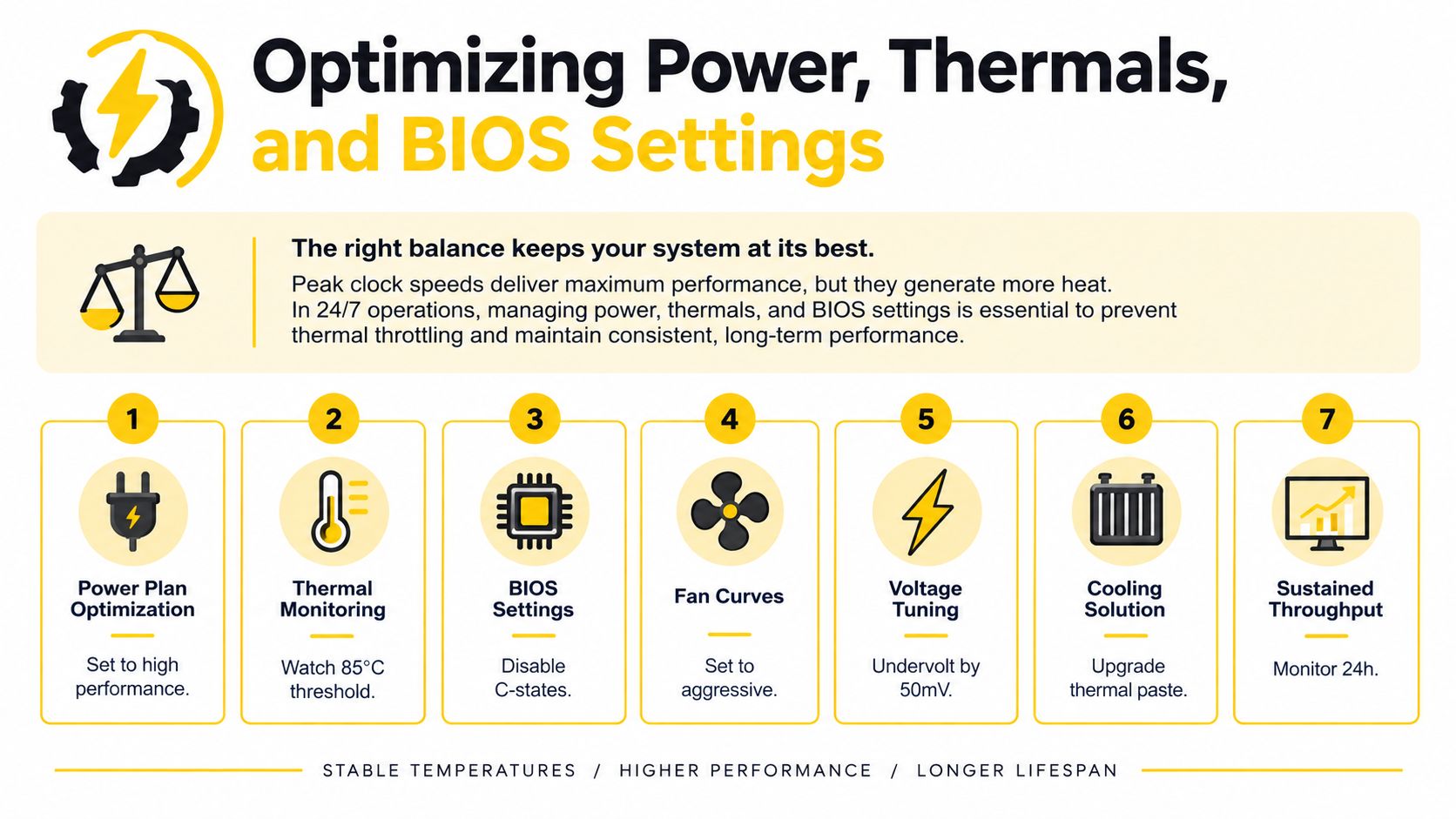
Peak boost is a poor target for a workload that runs continuously. A processor can reach an impressive short burst, then reduce voltage, frequency, or package power once heat accumulates. Mining rewards sustained work, so the useful measurement is the stable operating point after the system has reached equilibrium.
Start with a baseline at stock settings. Record package power, temperature, effective frequency, fan speed, wall draw, and application throughput. Hardware telemetry from tools such as HWiNFO, turbostat, lm-sensors, or the platform's own monitoring utility can reveal whether the CPU is frequency-limited, power-limited, or thermally constrained.
Prefer stable all-core behavior
On AMD systems, Precision Boost Overdrive and Curve Optimizer can change the relationship between voltage, temperature, and boost behavior. On Intel systems, power-limit controls, load-line behavior, and voltage offsets serve similar purposes. Names and available controls vary by firmware, so write down every change and keep a known-good profile.
An undervolt may reduce heat and permit more consistent frequency, but an unstable undervolt can produce application errors, machine-check events, crashes, or incorrect results. Don't assume a system is stable because it survives a short benchmark. Test the exact mining workload and inspect logs.
Memory settings matter too. XMP and EXPO can improve usable memory bandwidth and latency, but they also raise the number of variables in a stability test. Validate memory separately before blaming the CPU for a failure.
Build a thermal control loop
Use a fan curve that reacts before the sustained limit, not after throttling has already begun. Improve case airflow, clean restrictive filters, and check cooler mounting and thermal-interface condition. Disable power-saving states only when measurement shows they introduce a problem. C-states can reduce idle consumption, and turning them off may increase power without improving a fully loaded mining run.
A high-performance operating-system profile can prevent unwanted frequency transitions, but it isn't automatically more efficient. Compare it with a balanced profile under the same steady workload. For practical guidance on reducing heat while preserving useful output, review this material on cooling efficiency for mining systems.
A sensible target is performance per watt at the wall, not the highest reported core frequency. Modern CPU design increasingly emphasizes efficiency and virtualization alongside raw speed. Reporting on newer server and client designs describes vendors pursuing performance-per-watt improvements through architectural and process changes, including Intel's Arrow Lake compute tiles moving to TSMC N3, as discussed in Semianalysis coverage of datacenter CPU efficiency. That direction reinforces the practical lesson: sustained throughput and power cost belong in the same graph.
Compiler Tweaks and Runtime Optimizations
A CPU can't optimize poorly generated instructions by itself. The compiler decides how loops are unrolled, whether data is vectorized, how branches are arranged, and which target architecture assumptions are safe. For a custom miner or computational binary, changing the toolchain can matter even when the source code remains unchanged.
A recent SPEC CPU comparison in the provided research reported that gcc-15 improved integer-rate performance by 4% on SPEC CPU17 and 8% on SPEC CPU26 compared with gcc-13. Those figures come from the cited study and don't establish the result for MinotaurX, but they demonstrate why compiler version belongs in a serious benchmark matrix. Test the complete binary, not just compilation time.
Compile for the machine you will run
Use an optimization level appropriate for the project, preserve symbols in profiling builds, and target the actual microarchitecture only when the binary won't be redistributed to incompatible systems. Flags such as -march=native can expose useful instructions on a local machine, while a portable release may need a conservative target. Check the compiler's vectorization reports instead of assuming that -O3 produced the desired loop.
Compare binaries using identical inputs, thread counts, affinity, power limits, and runtime duration. Keep the compiler version, linker, standard library, and build flags in the result record. A faster binary that fails on another host isn't a general optimization.
Keep the pipeline fed
Cache locality is often more valuable than adding instructions. Arrange hot data so workers reuse nearby memory, avoid unnecessary pointer chasing, and inspect access patterns with cache-miss counters. Software prefetching can help when the access pattern is predictable and the memory latency is visible, but a misplaced prefetch increases bandwidth demand and can evict useful lines.
Control flow has a similar trade-off. Branch-target alignment, predictable loop structure, and reduced misprediction can improve pipeline utilization. Intel's optimization material identifies cacheability, prefetching, and branch-target alignment as practical tools for reducing stalls. A historical result cited there found branch-target prefetching removed close to 40% of misses in some benchmarks and improved performance by 3% to 11% in others. Those are benchmark-dependent observations, not promises for a mining kernel.
For binary selection and runtime comparisons, use a documented test matrix rather than relying on reputation. A focused overview of mining programs for Cascoin workloads can help identify which software paths deserve profiling before you start changing compiler flags.
Configuring MinotaurX and Labyrinth Mining for Efficiency
Algorithm-specific tuning begins with the workload's actual behavior. MinotaurX is described by Cascoin as a CPU-friendly mining route intended for low-power participation, while Labyrinth Mining uses lightweight client activity around a virtual maze. They shouldn't be treated as interchangeable CPU stress tests. MinotaurX places its demand in the hashing path, whereas Labyrinth's useful configuration depends on how its client schedules and performs the maze simulation.

Establish a conservative MinotaurX baseline
Run the miner with a single worker configuration first. Confirm that shares are accepted, the process remains stable, and telemetry shows the expected CPU package behavior. Then increase worker count gradually while recording throughput, wall power, temperature, effective frequency, and rejected or failed work.
Don't equate thread count with performance. On a processor with simultaneous multithreading, start with one thread per physical core and compare that result with logical-core saturation. Keep the threads on the affinity set identified during profiling. If the miner exposes an affinity mask, use it directly. Otherwise, launch the process with the operating-system controls described earlier.
Memory footprint and locality still matter. Keep worker threads close to the memory domain they use, especially on multi-socket or NUMA systems. Avoid running unrelated compilers, virtual machines, or storage-heavy jobs on the same physical cores during a measurement run, because they can obscure whether MinotaurX or the host is responsible for stalls.
Treat Labyrinth as a separate workload
For Labyrinth Mining, begin with the recommended client defaults and measure its own activity rather than applying MinotaurX's thread assumptions. If the client offers worker, simulation, or processor-load controls, increase them only while monitoring responsiveness and steady power. The efficient setting is the one that produces stable participation without pushing the machine into thermal throttling.
Operating-system power profiles and processor limits can be useful here. A lower sustained package limit may preserve efficiency when a higher limit causes heat-related frequency reduction. Stop unnecessary background tasks, but verify the effect through wall measurements rather than assuming every stopped service changes the result.
Mining rule: Select threads for the algorithm's measured scaling curve, then select the power limit for the resulting steady state.
Keep separate configuration files for MinotaurX and Labyrinth. Record the client version, operating-system affinity, BIOS profile, compiler build where relevant, and pool-side result. This makes rollback possible when a new release changes thread behavior.
For broader context on selecting a CPU-oriented coin and comparing workload fit, consult this CPU mining guide from Cascoin. Treat any profitability calculation separately from engineering measurements, because market conditions and operating costs can change independently of hash efficiency.
Verifying Stability and Measuring Real-World Gains
An optimization is valid only when it survives the workload it was designed to improve. A system that hashes faster for a short interval but later throttles, crashes, or submits incorrect work hasn't improved. Stability testing must cover the CPU, memory, operating system, miner, and power delivery as one system.
Use a repeatable test record
Create a baseline before changing anything. Keep the same miner version, algorithm, pool, thread count, affinity, BIOS profile, ambient conditions, and measurement method. Measure after the machine reaches a steady thermal state, and compare more than instantaneous hashrate.
Record:
- Throughput: Accepted work or the miner's reported output over the same interval.
- Energy: Wall power, not just the CPU's internal package estimate.
- Thermals: Temperature, effective frequency, and evidence of throttling.
- Reliability: Crashes, rejected shares, hardware errors, machine-check events, and application warnings.
- System cost: Context switches, migrations, responsiveness, and background workload impact.
A newer compiler, affinity mask, undervolt, or power limit should be tested independently before combining changes. If you change five settings at once, you won't know which one helped or caused instability.
Test the failure modes
Run a CPU stress test, a memory test, and the actual mining workload. Watch system logs while the test runs. An undervolt can pass a synthetic workload and fail under a particular instruction mix, so the miner itself remains the final acceptance test.
On Windows, this guide to Windows system monitoring provides useful context for observing processes, resource pressure, and system behavior. On Linux, combine perf, turbostat, vmstat, iostat, and journalctl as appropriate for the host.
The most useful comparison is a table with baseline and candidate values. Keep a candidate only when it improves sustained throughput or efficiency without introducing errors, unacceptable temperature, or host-side disruption. If throughput rises but wall power rises faster, the change may be poor for a 24-hour operation. If power falls while throughput remains stable, you've found a meaningful efficiency improvement even if the headline clock is lower.
Use the bottleneck category to choose the next experiment. A cache-bound result points toward locality and memory placement. A branch-bound result points toward control-flow and prediction behavior. A thermal limit points toward voltage, cooling, or package power. Re-measure after every material change, because removing one bottleneck often exposes another.
Cascoin offers CPU-oriented MinotaurX mining and Labyrinth Mining through an open-source, community-driven network, giving you workloads where thread placement, thermal control, and performance-per-watt measurements can be applied directly. Visit Cascoin to review the available mining options and documentation, then benchmark your chosen client on your own hardware before committing to a long-running configuration.